Introduction
The humble backpack has evolved significantly over the past two decades. What was once relegated to students and travelers is now an essential accessory for anyone who works with portable technology. Whether you’re commuting between offices, working from coffee shops, traveling for business, or managing a hybrid work schedule, a quality laptop backpack can make a real difference in your daily routine.
A laptop backpack serves a specific purpose that regular bags simply don’t address adequately. It needs to protect expensive electronics, distribute weight evenly across your shoulders, provide quick access to your devices, and somehow still look professional enough for the modern workplace. Finding the right one involves understanding what features actually matter and how they translate to real-world usage.
This article explores what goes into a practical laptop backpack and how different designs approach the challenges that come with carrying technology every day. By examining the practical aspects of laptop bags, we can better understand what to look for when evaluating options for your own needs.
What Defines a Laptop-Specific Backpack
Before diving into specific features, it’s worth understanding what distinguishes a laptop backpack from a standard backpack. The primary differentiator is the dedicated laptop compartment. This isn’t just a marketing feature—it addresses genuine practical concerns.
A dedicated laptop sleeve provides several functional benefits. First, it creates a protective barrier between your device and other items in the bag. A laptop can easily be damaged by keys, pens, or the pressure of heavier objects against it. Second, a padded sleeve absorbs impact and shock from bumps and drops. Third, it allows you to organize your bag in a way that keeps your laptop accessible without having to dig through everything else you’re carrying.
The design philosophy behind laptop-specific bags assumes you’re carrying technology regularly and that this technology deserves a degree of protection and thoughtful organization. This is fundamentally different from a canvas tote or a generic hiking backpack, even if those bags technically have space for a laptop.
Key Features to Understand
The Laptop Compartment
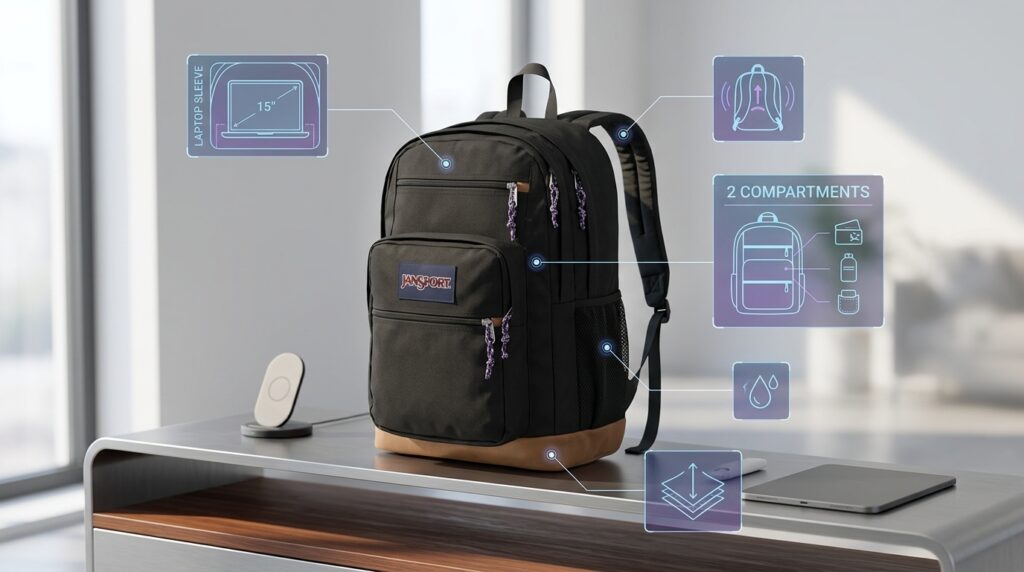
The laptop compartment is typically the most important feature to evaluate. A 15-inch sleeve accommodates most standard laptop sizes—this dimension usually fits devices ranging from roughly 13 to 15.6 inches diagonally. Most modern laptops fall within this range, though smaller ultrabooks and some larger workstations may require different considerations.
The padding quality in this compartment matters more than you might initially think. A thin sleeve offers minimal protection, while substantial padding absorbs more impact. Many laptop compartments include multiple layers of protection, sometimes combining foam, neoprene, or other materials. The goal is to create a buffer that protects against both sharp impacts and gradual pressure.
Placement of the laptop compartment varies across bag designs. Some bags place it against the back panel (the side touching your body), while others position it more centrally or toward the front. Back-mounted compartments theoretically take the bulk of your backpack’s weight and position it closest to your spine, which can be more ergonomic. Front-oriented compartments make the laptop easier to access.
Compartmentalization and Organization
The mention of multiple compartments speaks to how the bag divides its interior space. Two compartments typically means one main storage area and one dedicated laptop sleeve, though this can vary. The organization system affects how easily you can find things and how efficiently you can pack the bag.
Secondary compartments might be smaller and suitable for accessories like chargers, cables, external drives, or personal items. Organization pockets help prevent things from shifting around inside the bag, which is particularly important when your bag contains electronics that could be damaged by constant movement.
The advantage of thoughtful compartmentalization is that it prevents your laptop from being jostled around with heavier items and reduces the total time you spend searching for specific items. If you carry the same items most days, an organized bag means you can reach for what you need without unpacking everything.
Ergonomic Design and Carrying Comfort
Any backpack that goes on your shoulders needs to consider how weight is distributed and supported. Ergonomic design in backpacks addresses several specific concerns: how the weight sits relative to your spine, how straps distribute pressure across your shoulders, and how the bag’s structure maintains its shape while loaded.
Ergonomic straps are typically padded and contoured to follow the natural shape of your shoulder. They’re often wider than standard backpack straps, spreading the load across a larger surface area rather than creating pressure points. This becomes increasingly important the heavier your bag is or the longer you carry it.
The back panel of the bag also plays a role in ergonomic comfort. A structured back panel helps maintain the bag’s shape and can provide additional support. Some bags include lumbar support or contouring that follows the natural curve of your lower back.
Weight distribution matters as much as strap design. A well-designed laptop backpack positions heavier items (like your laptop) close to your spine and toward the center of the bag, rather than allowing them to hang away from your body. This principle comes directly from ergonomic research on how to carry loads safely and comfortably.
Material Composition
The exterior material of your backpack affects durability, appearance, and maintenance requirements. Common materials for laptop backpacks include ballistic nylon, polyester blends, and canvas. These materials are chosen for their resistance to tearing, ability to shed water, and longevity under regular use.
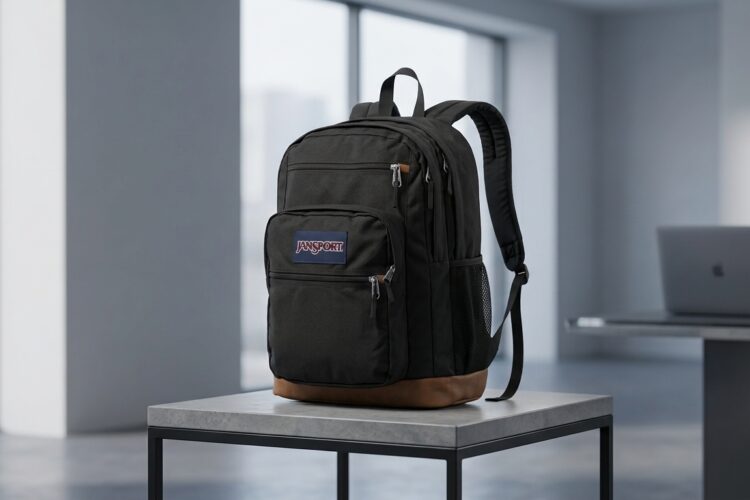
Black is a practical color choice for a daily-use backpack. It’s less likely to show dirt and wear compared to lighter colors, it coordinates with most professional wardrobes, and it tends to absorb less heat than lighter alternatives—an advantage if you’re carrying electronics that generate their own heat.
Material weight and thickness affect how the bag handles daily stress. A heavier material generally indicates more substantial protection, though it also means the empty bag itself weighs more. This is a tradeoff worth considering, especially if you’re carrying the bag for extended periods.
Closure and Access Systems
How a backpack opens and closes affects both security and accessibility. Traditional zippered compartments are secure and weatherproof but require two hands to open. Some bags use combination closure systems that balance convenience with security.
The placement of zippers and access points matters in daily usage. A laptop compartment that’s easily accessible from the side or top of the bag allows you to retrieve your device quickly without fully opening your main compartment. This is particularly valuable if you’re moving between locations frequently or working in environments where you need quick device access.
Practical Applications and Use Cases
Professional and Corporate Environments
A laptop backpack with professional styling can work well for traditional office settings, especially in creative industries, tech companies, or roles that involve moving between meeting spaces. The key consideration is whether the office culture and personal style align with backpack carrying. Some corporate environments still have strong expectations around briefcases or rolling luggage, while others embrace the practicality of backpacks.
For commuting to an office, a laptop backpack distributes weight evenly and leaves your hands free compared to a shoulder bag or briefcase. This is a genuine advantage when using public transportation, walking through parking garages, or navigating busy downtown areas.
Remote and Hybrid Work Scenarios
The rise of hybrid and remote work has actually increased the relevance of quality laptop backpacks. Many professionals who split their time between home and office use their bag to transport laptops, peripherals, and documentation. A well-organized backpack makes these transitions more efficient and reduces the likelihood of forgetting essential items.
For someone working from multiple locations—coffee shops, co-working spaces, client offices—a good laptop backpack becomes infrastructure. It keeps your working life organized and portable.
Travel and Business Trips
Frequent travelers often discover that a dedicated laptop backpack simplifies airport navigation. A bag designed specifically for laptops makes it faster to remove your device during security screening. The organized compartments help you pack efficiently for multi-day trips, keeping important electronics secure and accessible.
Many business travelers use a laptop backpack as their personal item for flights, keeping their most essential electronics with them rather than checking them with luggage. This practice requires a backpack that’s compact enough to fit under airplane seats while still holding everything you need during the flight.
Student Use
While this product accommodates various needs, students remain a significant user base for quality backpacks. The combination of laptop protection, organizational compartments, and comfortable carrying makes sense for someone moving between classes, libraries, and campus locations. A backpack that protects expensive electronics also protects important coursework and assignments.
Creative Professionals and Field Work
Photographers, videographers, designers, and other creative professionals often need to transport laptops alongside other equipment. A laptop backpack with multiple compartments can serve as a base, with additional items organized around the protected laptop compartment.
Who Might Find This Approach Useful
Technology-Dependent Professionals
Anyone whose work centers on a laptop benefits from a bag designed specifically for that use case. This includes writers, programmers, designers, consultants, and countless other roles where your computing device is central to your work.
Frequent Commuters
People who move between locations regularly gain real value from a bag that’s specifically optimized for carrying technology. The ergonomic design becomes more important the longer you carry the bag in a single trip.
People Concerned with Device Protection
If your laptop represents a significant financial investment and is essential to your livelihood, protecting it from damage becomes a practical priority. A dedicated, well-padded laptop compartment addresses this concern more effectively than generic solutions.
Those Seeking Organized Carrying Solutions
Some people simply prefer the organizational clarity that compartmentalization provides. If you find yourself constantly searching for items in a bag or worried about things shifting around, the structured approach of a dedicated laptop backpack addresses this frustration.
Anyone Transitioning from Other Carrying Methods
People moving away from briefcases, shoulder bags, or rolling luggage to backpacks often prioritize models designed specifically for laptops. These designs tend to offer more structure and protection than generic backpacks, creating a natural transition point.
Important Things to Consider Before Deciding
Laptop Dimension Compatibility
The 15-inch specification refers to the diagonal measurement of laptop screens, but actual device dimensions vary. A laptop with a 15-inch screen in a traditional 4:3 aspect ratio will be larger than a 15-inch ultrabook with a wider screen format. Checking the actual compartment dimensions against your specific device is important.
If you use multiple laptops or think you might in the future, understanding the maximum dimensions the compartment accommodates helps ensure this bag will remain relevant. Similarly, if you sometimes need to carry a tablet or other portable devices alongside your laptop, verify that the compartment design allows for this.
Your Actual Daily Carrying Needs
Laptop backpacks come with built-in capacity and organizational assumptions. If you typically carry minimal items beyond your laptop, you might not need a large two-compartment design. Conversely, if you regularly pack multiple devices, documentation, and personal items, this design might feel appropriate or possibly even modest.
Consider what a typical day looks like for you. How much beyond your laptop do you actually carry? What items do you access most frequently? What needs stays at home or in a desk? These questions help clarify whether a particular bag’s design matches your reality.
Climate and Weather Considerations
A laptop backpack that doesn’t offer water resistance leaves your electronics vulnerable in wet conditions. While not every backpack needs to be fully waterproof, at least water-resistant materials provide basic protection during rain or accidental spills. Consider your local climate and weather patterns when evaluating material choices.
Style and Professional Context
Beyond pure functionality, how a backpack looks matters in professional settings. Some environments embrace casual backpacks, while others maintain more formal dress codes. Black is a neutral choice that works in most contexts, but it’s worth thinking through whether a backpack fits your personal style and professional environment.
Durability and Longevity Expectations
A quality laptop backpack can last many years with normal use. Consider whether you expect to use this bag daily for years or whether you’re looking for something shorter-term. This affects how much you should prioritize durability features like reinforced stress points and high-quality materials.
Comparing Different Approaches to Laptop Backpacks
The market for laptop backpacks is diverse, with various approaches to solving the core problem of carrying portable technology safely. Understanding these different philosophies helps clarify what trade-offs exist.
Minimalist vs. Feature-Rich Design
Some laptop backpacks prioritize simplicity and lightness, offering basic protection for your device and minimal additional organization. Others include extensive compartmentalization, numerous pockets, and additional features like USB charging ports or built-in cable management.
The minimalist approach results in a lighter bag that’s easier to carry and less likely to tempt you to overpack. The feature-rich approach provides solutions for organizing many items and streamlines certain tasks (like charging devices). Neither approach is objectively superior—it depends on your specific needs and how you prefer to organize your carrying life.
Hard vs. Soft Shell Protection
Some bags use rigid, hard-shell protection for the laptop compartment, similar to a protective case. Others rely on thick padding and structural integrity to protect devices. Hard shells offer maximum protection but add weight and bulk. Soft shells are lighter and more flexible but depend on padding thickness and quality.
Specialized Tech Features
Modern laptop backpacks increasingly include features like built-in cable routing, designated compartments for specific devices, anti-theft designs, or technology-specific features. These features address real problems but also increase complexity and typically add weight to the design.
Aesthetic Approaches
Some backpacks prioritize looks that blend into business or casual professional settings. Others lean into tech-specific aesthetics with additional straps, modular designs, or distinct color schemes. This is purely a matter of personal preference and context.
Frequently Asked Questions About Laptop Backpacks
Q: Will a 15-inch laptop sleeve work with smaller devices?
A: Generally yes. A sleeve designed for 15-inch laptops can accommodate smaller devices, though there may be more movement inside the compartment. Many people use padding or dividers to take up extra space and prevent smaller laptops from shifting around. Conversely, larger devices (like some 17-inch laptops) will be too big for this compartment.
Q: How much additional weight does a quality laptop backpack add?
A: Quality laptop backpacks typically weigh between 1.5 to 2.5 pounds when empty, depending on materials and design. This is a modest addition compared to your laptop’s weight, but it’s worth considering if you’re sensitive to overall load weight.
Q: Can I use a laptop backpack for non-work purposes?
A: Absolutely. A well-designed backpack works for travel, photography, school, or any scenario where you need to carry a laptop and other items. The laptop compartment is there for when you need it, and the rest of the bag functions as regular storage.
Q: How do I clean and maintain a laptop backpack?
A: Most laptop backpacks can be cleaned with a damp cloth and mild soap. For deeper cleaning, check manufacturer recommendations—some materials can handle gentle machine washing, while others require hand cleaning. Allow the bag to air dry completely before storing it or using it with electronics.
Q: Is an ergonomic backpack actually better than a regular backpack?
A: For regular, extended carrying, yes. Ergonomic design features like padded straps, structured back panels, and weight distribution optimizations genuinely reduce strain during long carrying sessions. The benefits become more noticeable the heavier your load or the longer you carry.
Q: What’s the difference between laptop backpacks and camera bags?
A: Camera bags prioritize flexibility and protection for non-rectangular equipment, often including adjustable dividers and multiple compartments for lenses and bodies. Laptop bags typically optimize for protecting one larger item (your laptop) and organizing accessories around it. They serve different purposes, though some people use them interchangeably.
Q: How waterproof does a laptop backpack need to be?
A: True waterproofing is rare in backpacks because zippers are difficult to make completely waterproof. Most quality laptop backpacks offer water resistance through treated materials and design. For complete water protection, you’d need a specialized dry bag or hard case.
Q: Can I carry multiple laptops in one backpack?
A: A compartment designed for one 15-inch laptop isn’t intended to safely hold multiple devices simultaneously. Carrying multiple laptops in a single backpack risks damage to one or both devices. If you need to transport multiple laptops regularly, a bag with multiple laptop compartments or a larger solution would be more appropriate.
Q: What’s a reasonable lifespan for a laptop backpack?
A: With normal use, a quality backpack often lasts five to ten years or longer. The actual lifespan depends on how heavily you use it, environmental factors, and how well you maintain it. Zippers may need replacement before the fabric wears out, but this is often repairable.
Conclusion
Choosing a laptop backpack involves balancing practical features, personal needs, and personal preferences. A bag with a 15-inch laptop compartment, multiple organizational sections, and ergonomic design addresses the core requirements for many people who need to carry portable technology regularly.
The decision ultimately depends on your specific situation: How much do you carry beyond your laptop? How important is professional appearance in your context? How much weight do you typically transport? What features would genuinely improve your daily routine versus those that just sound nice?
Rather than chasing every possible feature, the most useful approach is identifying the features that matter for your actual lifestyle. A thoughtfully designed laptop backpack serves as practical infrastructure for your working life, making daily transitions between locations more efficient and your equipment more secure.
Whether you’re a business professional, student, creative worker, or frequent traveler, understanding what goes into a functional laptop backpack helps you make a decision aligned with your real needs rather than marketing messaging.